
|
|
|
|
Cubix Digital Cockpit for Command and Control Centers Strap yourself in and take control Like a fighter pilot with overwhelming horsepower at his fingertip control, in a Cubix Digital Cockpit™ your operator/user has command and control within his easy reach of his entire operation with multi-screen views of multiple applications running on multiple computer systems.
The fighter pilot has information flowing in from sophisticated panel displays so that he can make instantaneous critical navigational decisions. So too will your operators be able to make crucial operational choices commanding the Cubix Digital Cockpit. 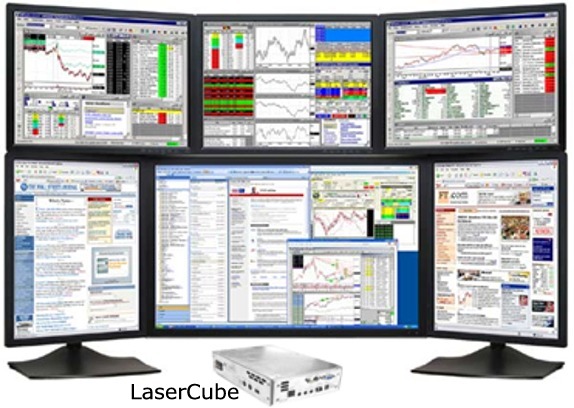 Cubix puts your operator/users into the most efficiently designed Command & Control Center Cockpit possible, using dazzling multi-screen displays that are driven by the latest Intel-based processors and chipsets designed into Cubix LaserBlade blade PC processing engines. Within the Digital Cockpit, operators use minimum movements to produce maximum results. Multiple applications from multiple computers are displayed on multiple screens, all controlled with a single mouse and keyboard without the need for a KVM switch. Mouse movements across as many as 8 individual displays are fluid and seamless, allowing your operators to access multiple computers simultaneously through a common Cubix video portal blade. The Cubix Digital Cockpit is the ultimate work area. Every inch of work area is optimized for space-saving and cost-saving efficiency. The display screens (up to 8 or more) and peripheral devices such as the keyboard and mouse plug into a small head end noiseless appliance (LaserCube). The LaserCube contains an adapter that Cubix designs and manufactures to import I/O connections (for monitors, keyboards, mice, USB ports and adapters) over distance, up to thousands of meters, from a Cubix rack mounted blade PC (LaserBlade). The high-performance LaserBlade provides standard thick-client PC functionality without compromise so all of your applications will work without fail. For better security, serviceability, space-savings, and noiseless operation, all of the computing resources are removed from the operator/user’s work environment in the Cubix Digital Cockpit. Cubix designs densely packaged rack mount blade PCs that are located far from the operators in secure, air-conditioned datacenters. This way the PCs driving the Digital Cockpit can be more easily serviced and can be centrally managed. Command Center before Cubix Digital Cockpit The Cubix Digital Cockpit contrasts greatly with inefficiently designed command centers that have embedded PCs in the operation center’s furniture next to the operator/users. Providing proper airflow for PCs embedded in furniture is often very difficult. Multiple PCs embedded in office furniture are noisy, hot, unserviceable, unmanageable, not secure, and not human-friendly.  In addition, embedding PCs near operator/users creates a wiring and cabling nightmare for the installation team.  Command Center after Cubix Digital Cockpit All of the problems associated with embedding PCs are eliminated in the Cubix Digital Cockpit.  Including the elimination of complicated and costly wiring installations. With the Cubix Digital Cockpit, the installation process is less costly and more simplified.  COMMAND AND CONTROL CENTER QUESTIONS THAT LEAD TO A BETTER SOLUTION – CUBIX LASERBLADES Q1. Would you like to optimize work area space by reducing equipment desktop footprints and/or removing as much equipment from your operators’ stations as possible? A1. A LaserBlade desktop appliance is very small. Other than the I/O connections for monitors, keyboards, mice and USB 2.0 devices provided at the LaserBlade desktop appliance, no PCs are near your operators. Instead, the LaserBlades are rack mounted hundreds of meters, up to thousands of meters, from your users. Q2. Are you interested in securing your data so that operators cannot remove it from the network? A2. Hard drives and their associated data are located on the LaserBlades in secure, locked down data centers. Users do not have access to the physical assets. Q3. Are you interested in a quieter, more comfortable work environment? A3. PCs have hot power supplies and noisy fans. Blades do too. However, the LaserBlades are not near the operators so they are not disruptive. The LaserBlade appliance on the desktop is virtually noiseless Q4. In the event of a computer failure, would you like to be able to restore services to your operators as quickly as a few minutes? A4. Having a concentration of Blade PCs in a centralized rack allows you to move a cable to a spare blade to restore the user to full operation within seconds Q5. Would you like to save operating costs by:
A5. LaserBlades do all that. Q6. Would you like the ability to display programs from multiple computers across multiple monitors using a single keyboard and mouse, eliminating the need to manually switch KVM connections? A6. By adding a Video Portal Blade to your configuration, you can have multiple blades running independently, while outputting their programs through a single desktop connection to multiple monitors. This configuration provides single mouse and keyboard control of multiple blades and their associated software applications without the need for a KVM switch. Mouse movement is seamless from monitor to monitor. Q7. For disaster recovery initiatives, would you like to locate the LaserBlades in another building or in another city and still have full PC functionality? A7. By configuring a nest of Video Portal Blades within 400 meters of your operator/users, you can locate hundreds of application processing LaserBlades anywhere there is a VPN connection. You can set up a disaster recovery center in another city and connect those LaserBlades to your operator/users in the case of an emergency. Q8. Would you like all the previous benefits, while preserving the true PC (thick client) experience so you get optimum performance and complete software compatibility using a non-proprietary PC platform? A8. Then use Cubix LaserBlades in your command and control center project!!! Call Cubix today (775-888-1000) to find out how we can help you design ultimate Digital Cockpits for your operator/users. |
|
Home: Cubix Blade Servers |
Cubix Technical Support |
About Cubix Blade Servers |
Contact Cubix Corporation ©2008 CUBIX Corporation
|


